We Moved to Headless WordPress — Here’s What No One Tells You

When we first started talking seriously about going headless at Jupitr, the conversations looked a lot like this:
“So the frontend and backend are… separate?”
“Why would you make WordPress more complicated?”
“Is this actually better for clients or just better for developers?”
Fair questions. And honestly, some of them took us a while to answer properly — because the honest answer isn’t just “headless is better.” It’s “headless is right in the right context, and here’s why we think that context is most of what we build now.”
Here’s what we wish someone had told us before we made the shift.
First — what does “headless WordPress” actually mean?
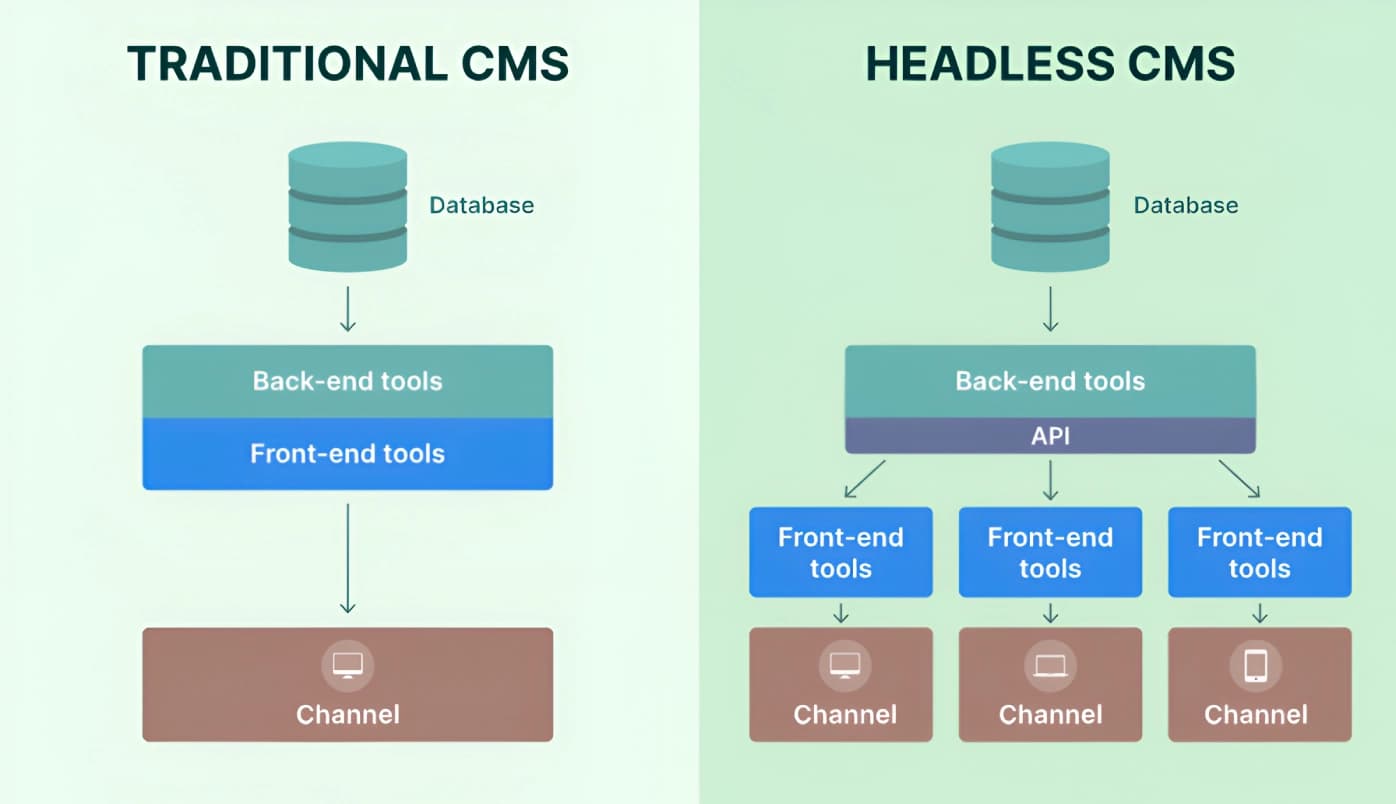
Traditional WordPress is one thing: your content, your design, your logic, all living together in the same system. WordPress handles everything from where your blog posts are stored to how your homepage looks.
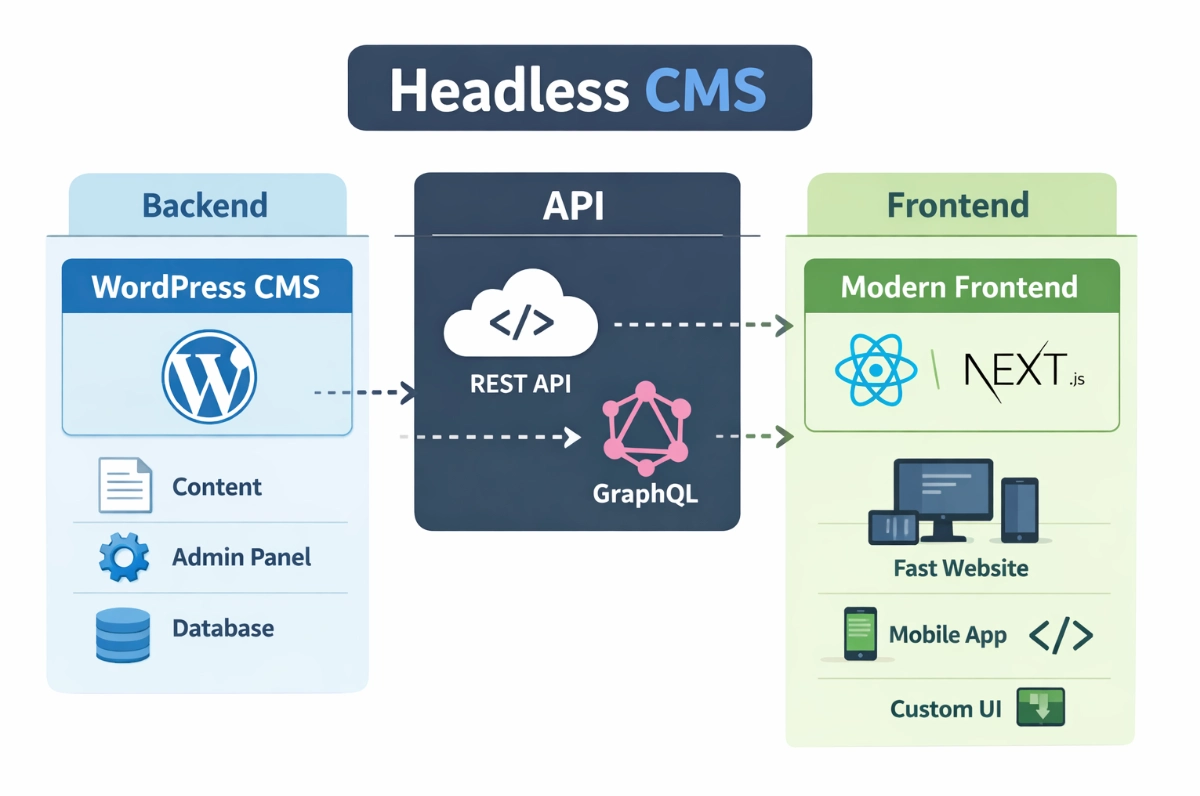
Headless WordPress splits that up. WordPress still does what it’s genuinely great at — managing content, handling editors, powering your admin panel. But the frontend — what your visitors actually see and interact with — is built separately, in a modern framework like Next.js.
The two talk to each other through an API. WordPress sends the data. Next.js renders it into a fast, modern website.
That’s it. It sounds more complicated than it is once you see it working.
Why we made the switch
The short version: traditional WordPress was becoming a bottleneck for the kind of work we wanted to do.
Plugin conflicts. Theme limitations. Performance ceilings that were genuinely hard to push past without fighting the system. We were spending more time working around WordPress than working with it.
More importantly, our clients were asking for things that traditional WordPress couldn’t deliver cleanly — faster load times, better mobile experiences, more flexibility in design without compromising performance. The kind of results that Core Web Vitals actually reward.
Headless gave us a clean separation: let WordPress do content management (which it’s genuinely excellent at), and let a modern frontend framework handle the user experience (which is what it’s built for).
What no one tells you: the real challenges
Here’s where most headless WordPress writeups go quiet. Let’s be honest.
The dev setup is more complex.
There’s no getting around it — you’re now managing two environments, not one. Your WordPress backend needs to be configured correctly to expose data. Your Next.js frontend needs to be set up to consume it. Deployments require more coordination. If something breaks, you need to know where to look.
Not every plugin works.
A big chunk of the WordPress plugin ecosystem is built for traditional rendering. Things like page builders, visual editors, certain SEO plugins — some work fine via the API, some need workarounds, some just don’t translate headlessly. You need to know this before you build, not after.
Your content editors need adjustment.
For clients who are used to seeing their changes reflected immediately in the WordPress editor, headless adds a layer of abstraction. Their content is in WordPress; the actual output is built elsewhere. This takes some onboarding.
Initial builds take longer.
The first headless project takes more time than a traditional build. You’re setting up infrastructure, not just installing a theme.
None of these are dealbreakers. But they’re real, and any agency telling you otherwise is selling you something.
What clients actually get from it
Here’s what makes it worth it:
Speed that’s genuinely noticeable. Next.js with static generation means pages that load almost instantly. We’re talking sub-second load times on pages that previously scored poorly on Core Web Vitals. For Bali businesses where most visitors are on mobile and patience is low, this matters.
Design freedom without fighting the system. We’re no longer constrained by what a WordPress theme will allow. The frontend is just code — it can look like anything, behave like anything, without hacking around a page builder’s limitations.
Security by default. When your WordPress backend isn’t the thing visitors interact with directly, your attack surface shrinks significantly. No exposed wp-admin to the public internet if you configure it right.
Content management stays simple for clients. This is the part people don’t expect: clients still log into WordPress, still write their posts, still update their pages exactly how they always did. The complexity is on our side, not theirs.

Who it’s actually for
We recommend headless for most of the serious web projects we take on now — but “most” isn’t “all.”
If you’re a small business that needs a simple brochure site up fast and on a tight budget, traditional WordPress is probably the right call. The overhead of a headless setup doesn’t make sense at that scale.
But if you care about performance, if your site is a real business asset, if you have ongoing content to manage, if you want something that scales without becoming a maintenance nightmare — headless is where we’d point you.
The learning curve is real. The payoff is realer.
What it means when you work with Jupitr
When we take on a headless project, you get WordPress as your content management system — familiar, flexible, easy for your team to use — and a Next.js frontend that delivers the performance and design quality your business deserves.
We handle the complexity. You handle the content.
If you’re wondering whether headless makes sense for your project, that’s exactly the conversation we like having.
FAQs
Do my content editors need to learn a new system if we go headless?
No — and this is one of the biggest misconceptions. Your team still logs into WordPress, writes posts, updates pages, and manages content exactly the same way. The headless part is invisible to them. All the complexity lives on the development side, not the content side.
Will headless WordPress break my existing plugins?
Some plugins will need replacing or rethinking. Anything that relies on WordPress rendering the frontend — certain page builders, some form plugins, visual editors — won’t work the same way headlessly. We assess this at the start of every project so there are no surprises mid-build. It’s manageable, but it needs to be planned for.
Is headless WordPress more expensive to build?
Initial builds do take longer, so yes — upfront cost is higher than a traditional WordPress site. But the performance gains, reduced maintenance overhead over time, and design flexibility typically justify it for businesses treating their website as a serious asset. For a simple brochure site on a tight timeline, traditional WordPress might still be the right call.
What happens if something breaks on a headless site — who do we call?
You need an agency or developer who knows both environments — WordPress and your frontend framework (in our case, Next.js). This is one reason we don’t recommend going headless with a developer who only knows one side. At Jupitr, we own both ends, so there’s no pointing fingers between teams when something needs fixing.
Ratri Jawanes is the CTO of Jupitr Agency, a digital agency based in Bali specializing in headless WordPress development, web performance, and digital strategy.